
The System Menu
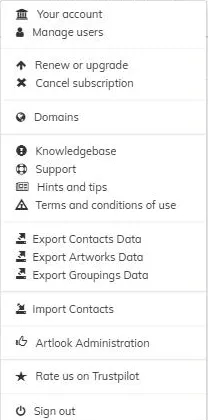
Click your login name at the top right of the screen, anywhere in Artlook, to open the System Menu. It’s the place to go for anything to do with your account, your subscription, your website’s domain, and getting further help.
What’s on it can vary a little depending on your account — for example, Renew or upgrade and Cancel subscription appear here instead of Manage your subscription and Billing if your account isn’t on a current paid plan, and Website analytics only shows once you have connected your domain name.
Your account and users
- Your account — your Artlook account details and subscription status. See checking your account status.
- Manage users — add or edit the people who can log in to your account. See managing users.
Subscription, billing and your website
- Manage your subscription, Billing — upgrade, renew, change your card, or download invoices. See your subscription and billing.
- Add e-commerce — subscribe to the Ecommerce module, for a modest additional charge, so buyers can pay you directly through your website. See how Ecommerce works.
- Domains — connect your own domain name to your Artlook website, or check your free default web address. See your website address.
- Website analytics — visitor statistics for your website, where this beta feature is available on your account. See website analytics.
Help and information
- Knowledgebase — opens Artlook’s online help centre in a new tab.
- Support — raise or check a support ticket. See using our support ticket system.
- Hints and tips — the Artlook team’s running page of practical tips and new features. See Other Features.
- Terms and conditions of use — the legal terms for using Artlook.
Exporting and importing data
- Export Contacts Data, Export Artworks Data, Export Groupings Data — download your data as a spreadsheet.
- Import Contacts — bring in contacts from a spreadsheet. See importing contacts.
And finally
- Rate us on Trustpilot — leave a review.
- Sign out — log out of Artlook.