
Setting up your account
You don’t need to talk to anyone to get started with Artlook — you can sign up and start using it straight away.
Choosing a plan
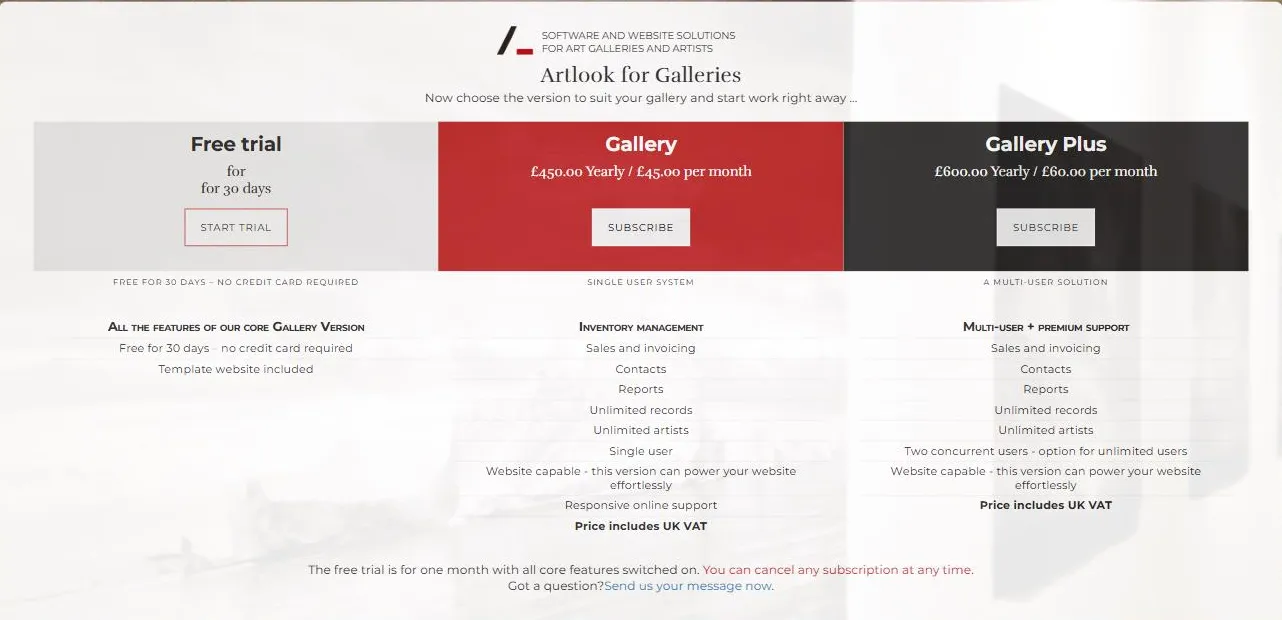
There are two paid plans for galleries, plus a free trial:
- Free trial — 30 days, with every feature switched on, no credit card required.
- Gallery — inventory management, sales and invoicing, contacts, reports, and a website, with unlimited records and unlimited artist records, for one user.
- Gallery Plus — everything in Gallery, plus two concurrent users as standard (with the option to add more), and premium support.
Both paid plans can be billed monthly or annually, and you can cancel a subscription at any time.
Filling in your details
Once you’ve picked a plan, fill in the sign-up form: your gallery or organisation name, your email address (this becomes your login), and a password — either type your own or use the password generator icon. You’ll also pick your country, optionally say how you heard about Artlook, and — if you already have a website — give its address, which helps our team if you later ask about moving it across to Artlook.
Tick the box to agree to the Terms of Use and Privacy Policy, confirm you’re not a robot, then submit the form to start your trial or subscription.
After you sign up
You’re taken straight into Artlook, ready to start adding your inventory and contacts. If you’re not sure where to begin, see finding your way around Artlook.
You can add a custom domain for your website, or ask Artlook to set your account up for you as a paid extra — see the plans page for current pricing on these options.